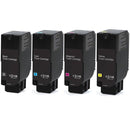
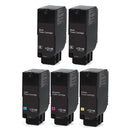
Keep your Xerox VersaLink C620 and C625 printers running smoothly with original replacement toner bundle. Designed for sharp text and vibrant colors, these Xerox toner cartridges offer reliable performance and a high page yield for cost-effective printing. Easy to install and engineered for the best compatibility, this toner bundle is the perfect choice for businesses and home offices looking to maintain professional print quality.
Key Features of Original Xerox VersaLink C620/C625 Toner Bundle
✅ Comprehensive Toner Set: This original toner bundle includes all four toner colors - Black, Cyan, Magenta, and Yellow - ensuring a complete replacement solution for your Xerox VersaLink C620 and VersaLink C625 printers.
✅ High Page Yield: Designed for extended use, each toner in the bundle delivers dependable coverage suitable for busy print environments, reducing the frequency of replacements and increasing productivity.
✅ Consistent Print Quality: Engineered for professional clarity, this Xerox toner bundle produces crisp black text and vibrant color graphics, making it perfect for reports, presentations, marketing materials, and everyday documents.
✅ Perfect Compatibility: Specifically formulated for Xerox VersaLink C620 and VersaLink C625 series printers, ensuring seamless installation, accurate toner detection, and reliable performance with every print.
✅ Reliable & Smooth Performance: Each Xerox VersaLink C620/C625 toner cartridge delivers stable, streak‑free printing with excellent toner adhesion and smooth toner flow, helping prevent smudges, streaks, and fading.
✅ Cost‑Effective Choice: Get high‑quality printing results from OEM toners at a discounted price, reducing your overall printing expenses without sacrificing performance.
FAQ – Original Xerox VersaLink C620/C625 Toner Bundle
Q: What toner cartridges does Xerox VersaLink C620/C625 printer use?
A: The Xerox VersaLink C620 and C625 printers use the same standard-yield cartridges and different high-yield cartridges.
Toner Cartridges for Xerox VersaLink C620:
- Xerox 006R04616 Black Toner Cartridge - Standard Yield - 8,000 Pages
- Xerox 006R04617 Cyan Toner Cartridge - Standard Yield - 6,000 Pages
- Xerox 006R04618 Magenta Toner Cartridge - Standard Yield - 6,000 Pages
- Xerox 006R04619 Yellow Toner Cartridge - Standard Yield - 6,000 Pages
- Xerox 006R04624 Black Toner Cartridge - High Yield - 20,000 Pages
- Xerox 006R04625 Cyan Toner Cartridge - High Yield - 12,000 Pages
- Xerox 006R04626 Magenta Toner Cartridge - High Yield - 12,000 Pages
- Xerox 006R04627 Yellow Toner Cartridge - High Yield - 12,000 Pages
Toner Cartridges for Xerox VersaLink C625, C625DN:
- Xerox 006R04616 Black Toner Cartridge - Standard Yield - 8,000 Pages
- Xerox 006R04617 Cyan Toner Cartridge - Standard Yield - 6,000 Pages
- Xerox 006R04618 Magenta Toner Cartridge - Standard Yield - 6,000 Pages
- Xerox 006R04619 Yellow Toner Cartridge - Standard Yield - 6,000 Pages
- Xerox 006R04636 Black Toner Cartridge - Extra High Yield - 25,000 Pages
- Xerox 006R04637 Cyan Toner Cartridge - Extra High Yield - 16,000 Pages
- Xerox 006R04638 Magenta Toner Cartridge - Extra High Yield - 16,000 Pages
- Xerox 006R04639 Yellow Toner Cartridge - Extra High Yield - 16,000 Pages
Q: What colors are included in the Xerox VersaLink C620/C625 toner bundle?
A: At Ready Toner, we offer two options for the Xerox VersaLink C620/C625 Toner Bundle:
-
K/C/M/Y 4-Pack: 1 x Black, 1 x Cyan, 1 x Magenta, and 1 x Yellow
-
K/K/C/M/Y 5-Pack: 2 x Black, 1 x Cyan, 1 x Magenta, and 1 x Yellow
The 5-Pack is a more cost-effective option for those who print more black and white documents.
Q: What is the warranty policy for these genuine Xerox VersaLink C620/C625 toner cartridges?
The warranty for these OEM Xerox toner cartridges is covered by the manufacturer and provided for 12 months from the date of its installation (commissioning), indicated in the warranty card.
Q: How can I maintain consistent print performance?
A: To ensure optimal results, store toners in a dry, cool place, swap toner cartridges before they are completely empty, and follow your printer’s maintenance prompts, including regular cleaning cycles.